Most tweets look the same. Same font, same weight, same shape, scrolling past in a feed that moves too fast to notice anything plain. A styled name or bio breaks that pattern instantly. This twitter fonts generator turns normal text into Unicode fonts for twitter you can paste straight into your X display name, bio, or tweets. No downloads, no design skills, just type and copy.
Twitter Fonts — Free Copy and Paste
Type your text and instantly see unique twitter fonts for your X bio, display name, and tweets. This free twitter font generator needs no signup, just copy and paste in seconds.
TtCharacter Count: 0𝕏X Weight: 0/ 280
18px
Jump to style:
Feed Stopper
Feed Stopper
Feed Stopper Voltage
Feed Stopper Play
Feed Stopper Star
Feed Stopper Diamond
Feed Stopper Lenticular
Feed Stopper Block
Feed Stopper Ornament
Feed Stopper Word Star
Bio Caps
Bio Caps
Bio Caps Arrow
Bio Caps Bracket
Bio Caps Diamond
Bio Caps Star
Bio Caps Word Dot
Bio Caps Word Pipe
Bio Caps Word Star
Bio Caps Word Dash
Chirp Break
Chirp Break
Chirp Break Bullet
Chirp Break Triangle
Chirp Break Hex Star
Chirp Break Angle
Chirp Break Pointer
Chirp Break Nested
Chirp Break Heavy
Chirp Break Chevron
Quote Tweet Serif
Quote Tweet Serif
Quote Tweet Serif Quoted
Quote Tweet Serif Single
Quote Tweet Serif Corner
Quote Tweet Serif Heart
Quote Tweet Serif Leaf
Quote Tweet Serif Floral
Quote Tweet Serif Tilde
Quote Tweet Serif Asterism
How to Use the Twitter Text Generator?
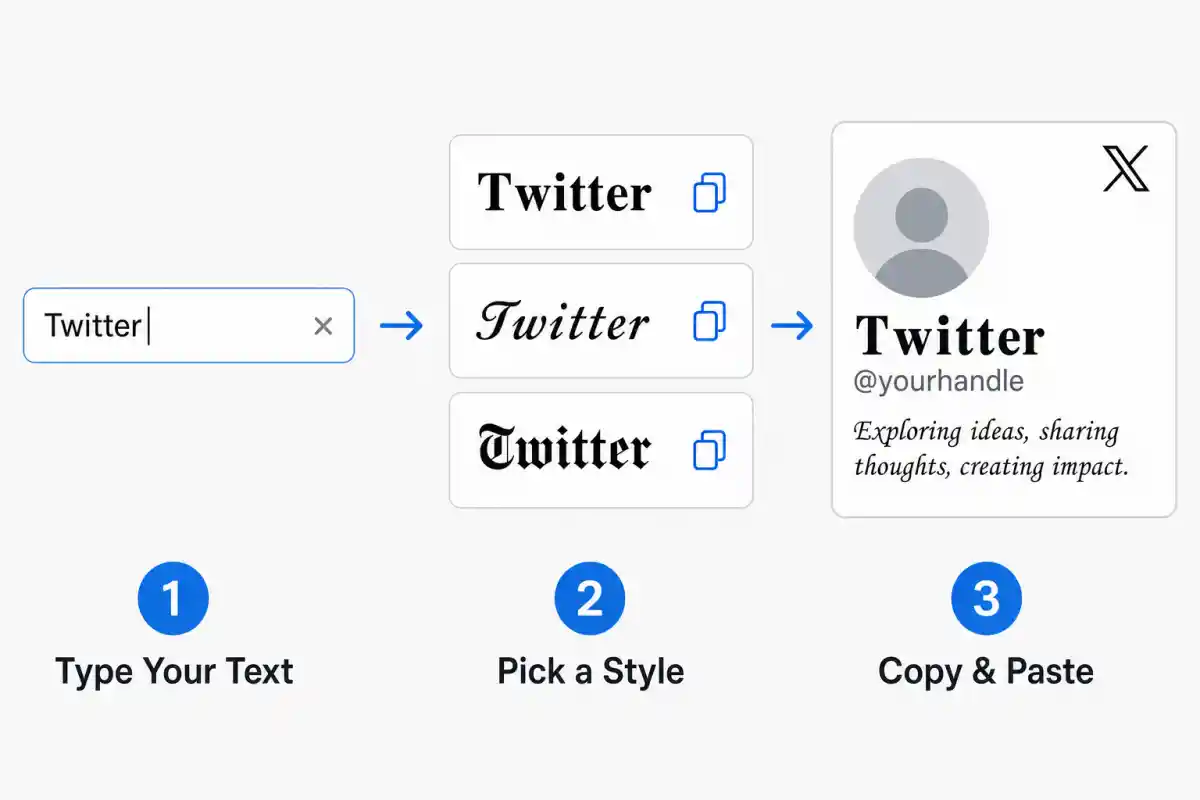
Type your text into the box above. This twitter font generator instantly shows it rendered in several styles, no waiting and no extra steps. Browse the results and pick the font for twitter that fits your bio, your tweet, or your display name. Click any style to copy it, then paste it directly into X. The whole process takes seconds and works the same way on phone or desktop.
1
Type Your Text
Type your text into the box above. This twitter font generator instantly shows it rendered in several styles, no waiting and no extra steps.
2
Pick a Style
Browse the results and pick the font for twitter that fits your bio, your tweet, or your display name.
3
Copy and Paste
Click any style to copy it, then paste it directly into X. The whole process takes seconds and works the same way on phone or desktop.
Why Twitter Fonts Exist?
A common question is what font does Twitter use natively. X runs on a typeface called Chirp, introduced in 2021 as part of a full visual redesign. Chirp controls how the platform looks on screen, but it is fixed. Users cannot change twitter text settings or install a different typeface inside the app itself.
That limit is exactly why a twitter font changer built on Unicode became popular. Instead of changing the font, people swap individual letters for visually similar Unicode characters that exist outside Chirp entirely.
Every character this generator produces already has a fixed address inside the Unicode standard, the same global system that stores every letter and symbol used across the world. Bold versions, script shapes, small caps, even stylized number characters each occupy their own dedicated section of that system.
When you type here, the generator locates the matching character from the right section and swaps it in. Because those characters already exist in your device's text layer, they paste into any app or platform without a font file or any kind of installation.
Where Styled Text Actually Works on X?
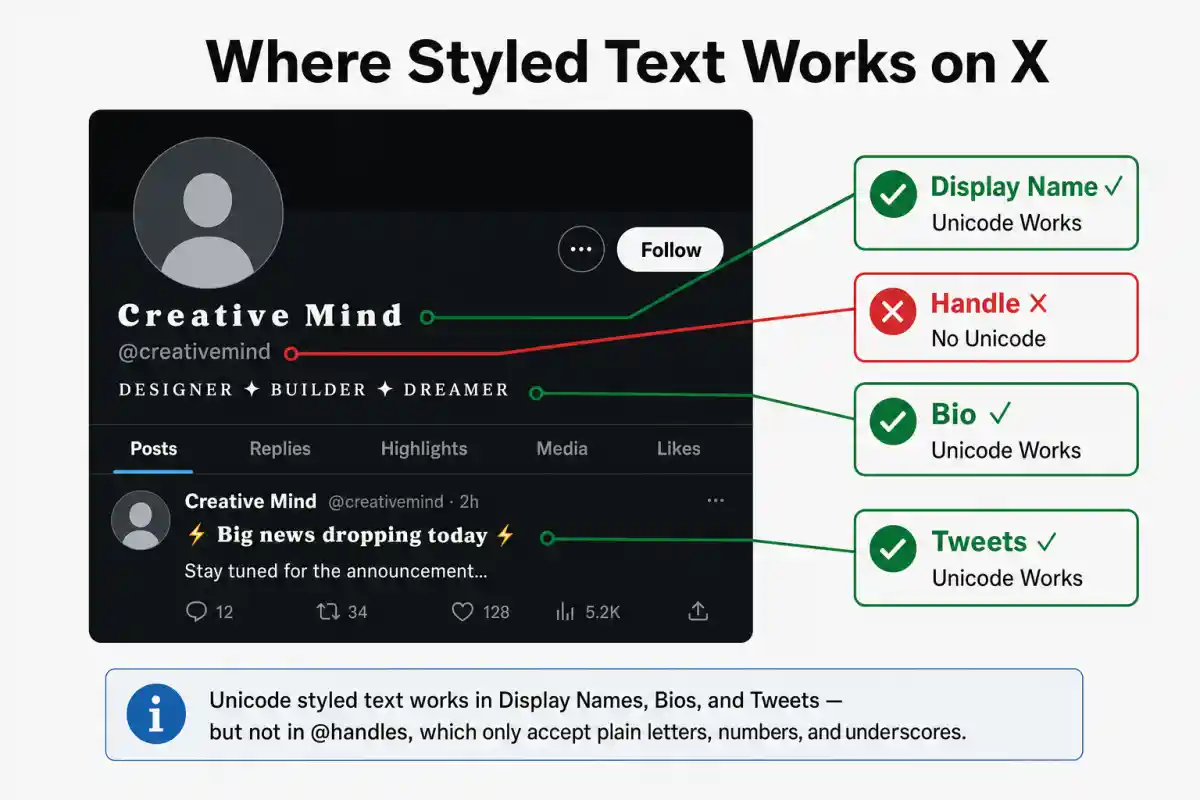
This is the part most generators get wrong, so it is worth stating clearly. Display name, bio, and tweet text all accept Unicode styling without restriction. Paste a styled name into any of these three fields and it will display exactly as shown.
The X handle works differently. Your handle is the unique identifier that follows the @ symbol and forms your profile link. X restricts handles to plain letters A through Z, the numbers 0 through 9, and underscores.
No other characters are accepted, and that includes every styled Unicode character this generator produces. If you try to save a styled handle, X will reject it at signup or during a username change.
So the short version: style your display name, your bio, and your tweets freely. Leave your actual handle in plain text, because X will not allow anything else there.
The Real Cost of Styled Text: Character Limits Explained
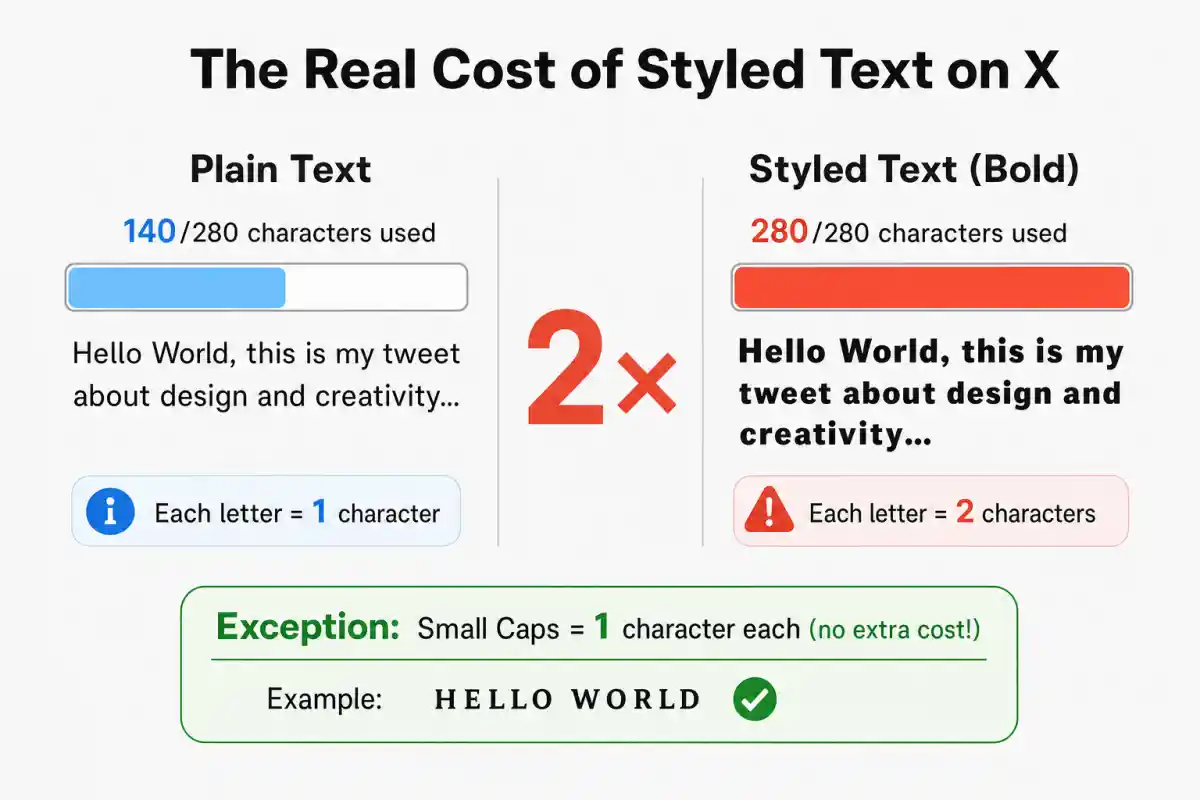
X gives every tweet a 280 character budget, but not every character costs the same. X counts text using a weighted system documented in its own developer guidelines. Plain Latin letters count as one character each. Characters from certain other ranges count as two.
Most decorative Unicode styles, including bold, script, gothic, and double struck, come from a part of Unicode called the supplementary plane. These characters sit outside the more common range computers use for everyday text, so X encodes each one using two linked code units instead of one.
X counts that pair as two characters rather than one. The practical result is significant. A tweet that holds 280 plain characters holds roughly 140 once it is fully styled in one of these sets, because every visible character is quietly costing double.
Small caps are the exception worth remembering. That style draws its characters from a different part of Unicode that sits inside the common range, so X counts it the same as plain text, one character each. It is the only major decorative style here with no hidden cost.
This matters most for tweets, where the 280 limit is tight to begin with, and for the 50 character display name field, where even a short styled phrase can use up the available space fast. The bio field gives more room at 160 characters, but the same doubling still applies to any heavily decorative style placed there. Knowing this in advance means you can style the part of your text that matters most, like an opening hook, without accidentally running out of room.
10 Twitter Font Styles and When to Use Them
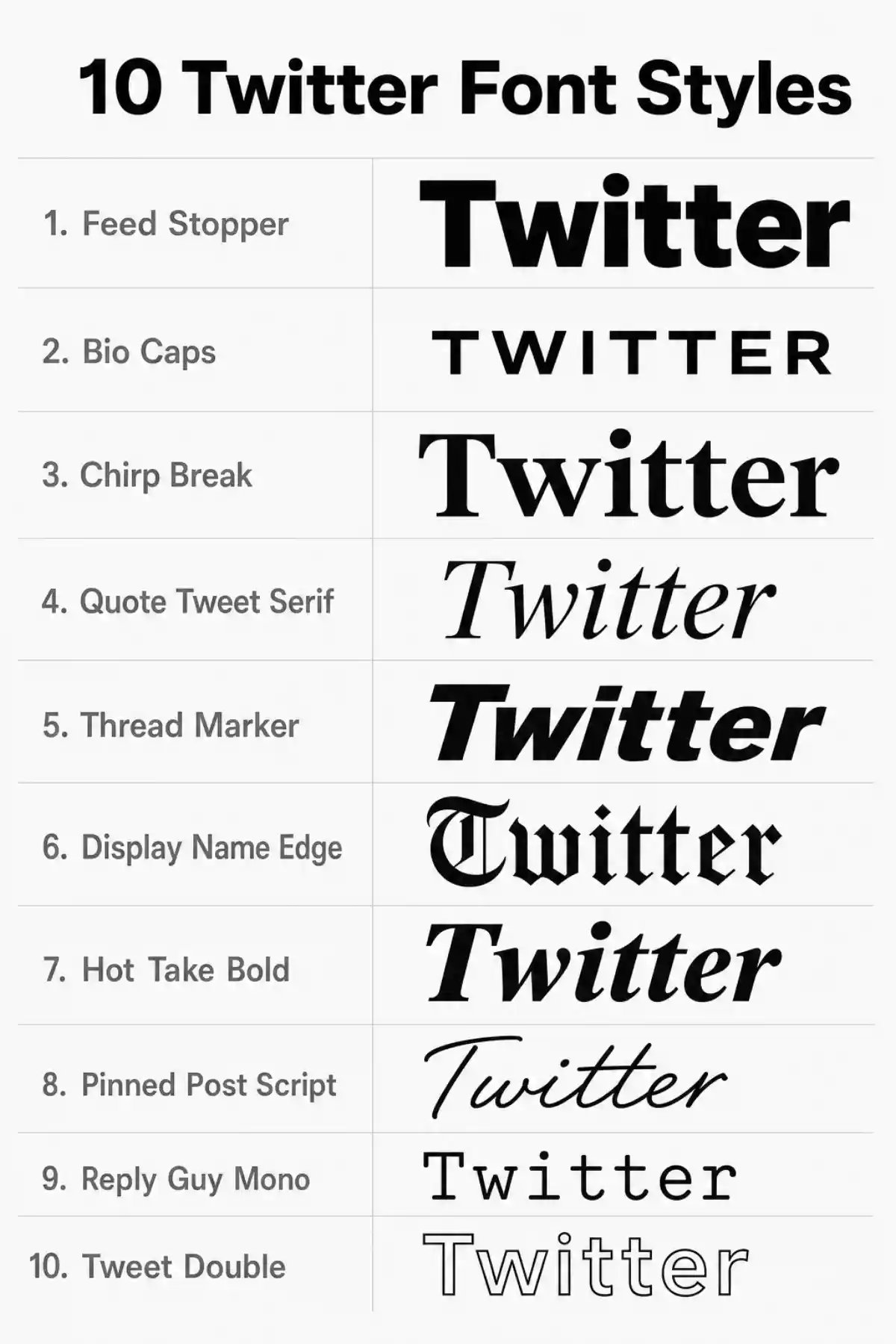
Each style below is built for a specific spot on X, not just decoration for its own sake. Whether you need twitter fonts for name fields, a bio, or a tweet itself, these ten cover the most common use cases.
Feed Stopper
A bold style built for the first few words of a tweet or a thread opener, the kind of tweet font that draws the eye immediately in a fast moving feed and suits the opening line people see before they decide to keep reading. For more bold styles beyond this one, the bold letters generator covers a wider set of heavy weight options.
Bio Caps
A small caps style designed for the 160 character bio field. Because small caps count as one character each on X, it gives you full use of the bio space with no hidden cost, making it the safest decorative choice for that field.
Chirp Break
A bold serif style meant to stand apart from X’s own Chirp typeface, which is sans-serif. The serif weight creates visible contrast against the platform’s default look, useful for a display name or brand account.
Quote Tweet Serif
An italic serif style suited to quote tweet commentary, where a softer or more personal tone fits the added text sitting above someone else’s post.
Thread Marker
A style scoped for numbering or labeling thread openers, such as “1/” style markers, providing a distinct look for thread navigation.
Display Name Edge
A double struck or fraktur style scoped specifically to the display name field, which caps out at 50 characters. Best used for short names rather than longer phrases, given the character cost involved.
Hot Take Bold
A bold italic style for opinion driven tweets or sharper openers, adding visual weight to a strong first line.
Pinned Post Script
A cursive style suited to the short introductory line on a pinned tweet, where a softer, more personal tone often fits the format.
Retweet Highlight
A set of frame and word-separator styles for added commentary on a retweet, drawing attention to the key phrase in your added text with bold or italic emphasis.
Reply Guy Mono
A monospace style for casual, conversational replies, giving short responses a distinct, slightly technical tone without looking overly formal.
Best Practices for Styling Tweets, Bios, and Display Names
Style the part of your text that needs attention most, not the whole post. Given the character cost explained above, the most effective approach is to style an opening hook, a key phrase, or a short headline, then leave the rest of the tweet in plain text. This keeps the post readable while still standing out where it matters.
The level of decoration that works well depends on what your profile is trying to do. A personal account has more freedom to use expressive styles since individual voice and character carry the post, and a bolder look fits that naturally. A business or creator account usually lands better with a lighter touch.
Heavier decorative styles pull attention away from the content itself and can make a profile harder to scan quickly, which works against the clarity a brand account needs. For a wider range of decorative options across all platforms, the fancy font maker covers 130+ styles beyond what this tool offers.
Screen readers generally read Unicode styled characters letter by letter rather than as whole words, since the characters are technically distinct from standard letters even though they look similar. This can make heavily styled text harder to follow for anyone using assistive technology. Reserve decorative styles for short phrases like names or hooks, and keep longer or important text, such as full sentences in a bio, in plain readable form.
Avoid mixing more than one or two styles in a single tweet or bio. Stacking several decorative sets together makes text harder to scan and can look cluttered rather than intentional. A single well placed style usually reads as more deliberate than several competing ones.
The same principle applies across platforms. Testing on facebook fonts showed the same readability tradeoff, since Facebook only supports genuine Unicode styles rather than installed Google Fonts, much like X.
Explore More Tools
Want more than Twitter fonts? Check out these generators for letters, symbols, and complete text styling.
Similar Font Styles
Frequently Asked Questions
Chirp, X’s native interface typeface introduced in 2021. It cannot be changed from within the app, which is why a twitter fonts generator like this one exists, see the section above for the full explanation.
X restricts handles to plain letters, numbers, and underscores only. This rule is enforced at signup and during any username change, so styled Unicode characters are rejected automatically. Display names, bios, and tweets do not have this restriction.
Often, yes. Most decorative styles, including bold, script, and gothic, count as two characters each on X because of how those characters are encoded. A fully styled tweet can use up its character limit twice as fast as plain text. Small caps are the exception and count the same as normal text.
No. Styled text is still plain Unicode text underneath the visual style. It remains fully readable and searchable, and X does not apply any special treatment to it.
Most modern phones, tablets, and browsers display Unicode characters correctly. On older devices or outdated software, an unsupported character may show as a small dotted box or line in its place instead of the styled letter, though this is uncommon on current systems.
No. Nothing is downloaded or installed. These are existing Unicode characters that visually resemble styled letters, which is exactly why they can be copied and pasted anywhere without any extra software.