This Big Text Generator takes any word or phrase and turns it into large styled text within seconds. The process stays simple from start to finish, enter a phrase, choose from the style options, then copy the result straight into wherever it needs to go. Whether someone searches using a huge text generator or the term used here, the same output comes back either way.
Big Text Generator — Copy and Paste
Type any word and turn it into big, large, or wide text in seconds. Copy it, paste it anywhere, and preview exactly how large it will look before you post it online.
TtCharacter Count: 0
18px
Add a symbol wrapper
Frame your text on both sides — or keep it plain.
Fullwidth
Fullwidth
Bold Sans
Bold Sans
Bold Serif
Bold Serif
Popular Combos
Ready-made style + symbol pairings — copy, scale, or share like any other card.
Fullwidth · Bold Arrow
Fullwidth · Bold Arrow
Fullwidth · Heavy Bar
Fullwidth · Heavy Bar
Bold Sans · Pointer
Bold Sans · Pointer
Bold Sans · Starburst
Bold Sans · Starburst
Bold Serif · Block Frame
Bold Serif · Block Frame
Bold Serif · Checker
Bold Serif · Checker
What is a Big Text Generator?
Unicode assigns a unique code to every letter, number, and symbol that exists, and a big text generator pulls from a different set of those codes than a keyboard normally uses. Enter a word, and styled versions appear immediately, built entirely from characters that already exist within that system. No download or installation happens at any point.
People often assume big style comes from a special font file, the same way a heavy typeface would. These styles work differently. Each one is a character that already lives inside Unicode, ready to display the moment you paste it. Your phone or computer already knows how to show it.
This tool works well for single letters and initials too, not just full words. A big letter generator use case, like styling a single monogram letter for a logo or a profile picture, uses the exact same Unicode characters as a full phrase, just applied to one letter instead of many.
Choosing a Big Text Style for Your Use Case
Picking a big font style comes down to how you want the weight to feel, not what the text can or cannot display. All three styles here cover every letter, number, and punctuation mark, so nothing gets left in plain text partway through a sentence.
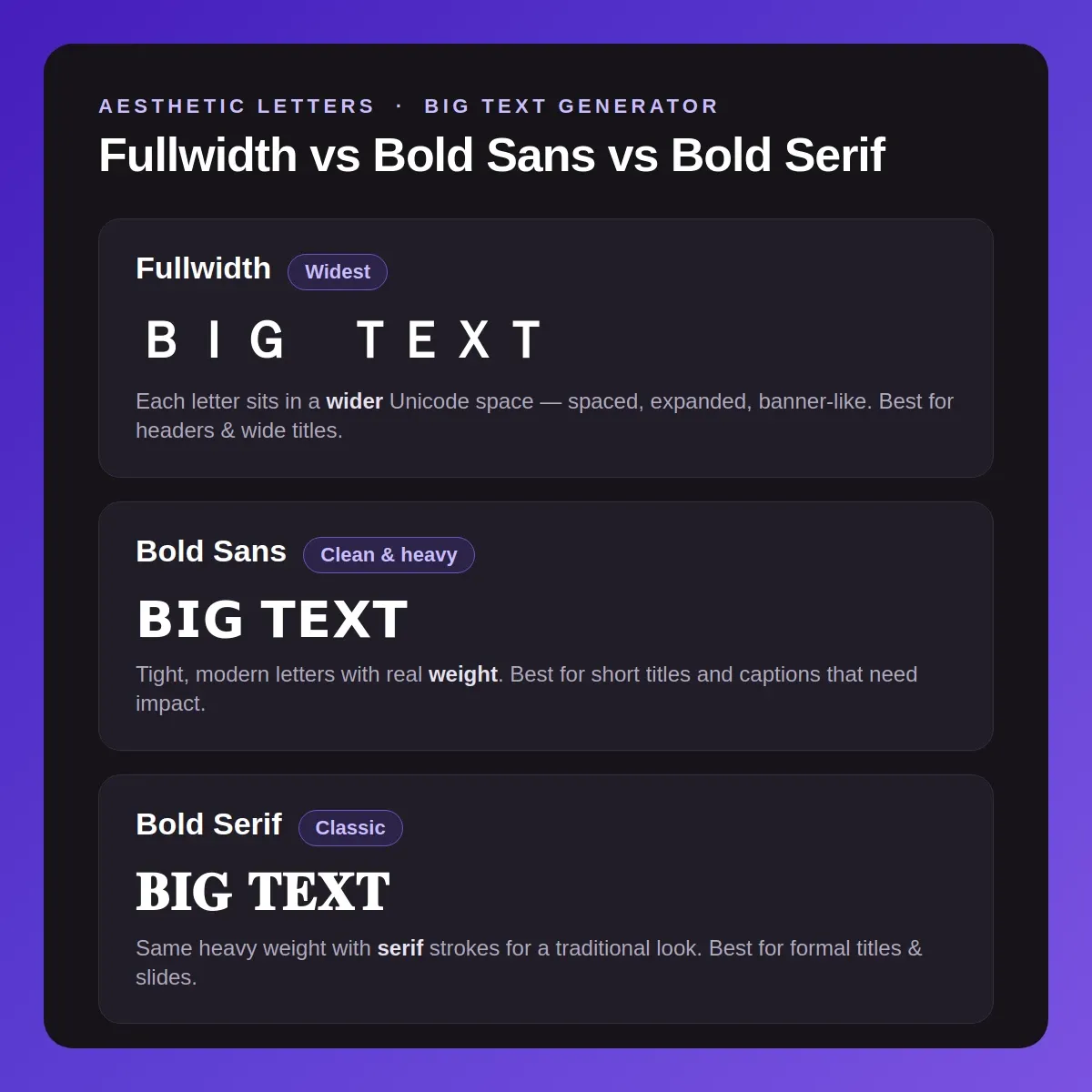
Fullwidth — the widest option
Fullwidth stretches every character out, making words look spaced and expanded rather than heavy. This style suits headers, banner text, and anywhere the goal is width and presence over boldness. Longer phrases stay readable even at this expanded width.
Bold Sans — clean and heavy
Bold Sans keeps letters tight and modern while adding real visual weight. This style works for both short titles and longer captions, since the heaviness never sacrifices spacing or clarity, even across a full sentence.
Bold Serif — classic and heavy
Bold Serif carries the same full coverage as Bold Sans, with small strokes at the letter ends for a more traditional look. This page uses only 2 of the 9 bold styles verified on our bold font generator, where the complete set lives, each checked letter by letter before publishing.
How to Copy and Paste Big Text?
A single word, a short phrase, or a full sentence all go through the identical process here, with no separate steps depending on length.
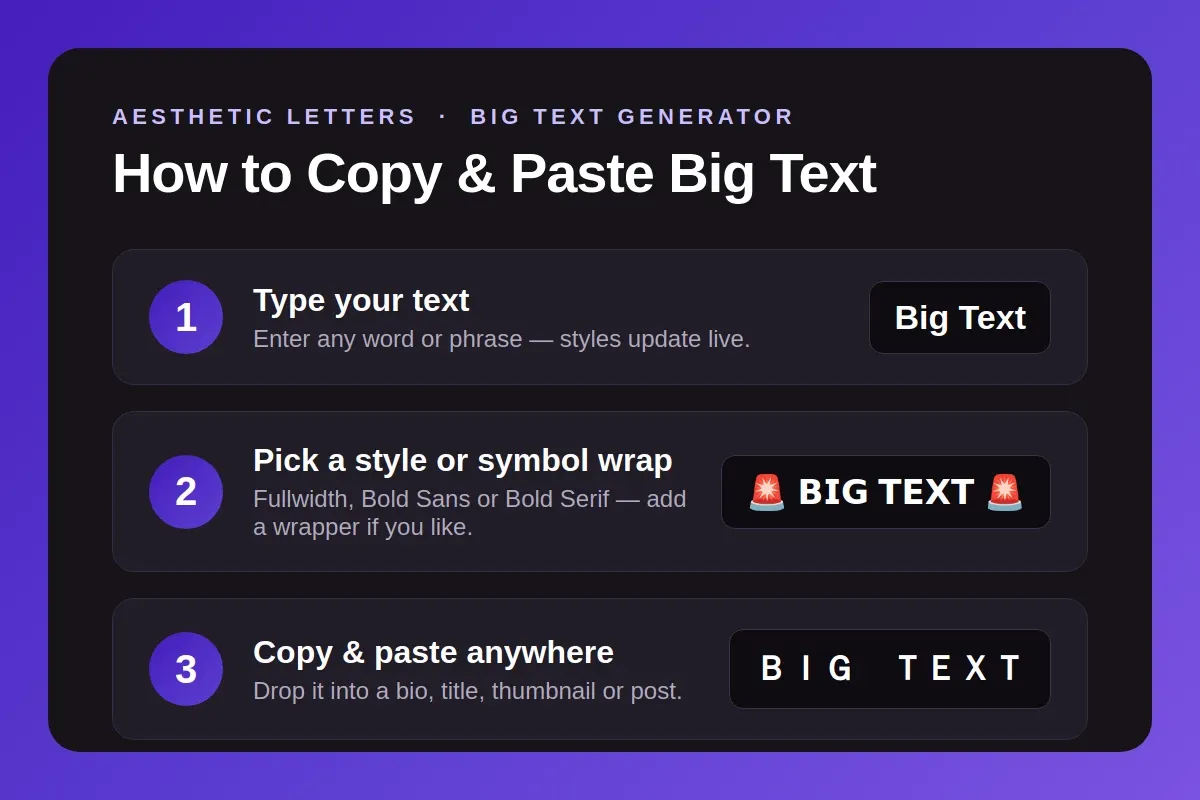
1
Enter Your Text
Find the input field near the top of the page and start typing. Every style card updates in real time as you type, without needing a separate submit action.
2
Compare the Styles
Browse the row of style cards beneath the input. Since each card renders your actual text rather than a placeholder example, you can judge the real result before committing to one.
3
Grab the Result
Select Copy under whichever card fits best, then drop it into a bio, a title, a thumbnail overlay, or any other field that takes plain text.
See Your Big Text at Full Size
A style card shows your text at a small, fixed size, which does not match how it will actually look once it lives on a thumbnail, a banner, or a website header. Click Preview at Scale on any style to see your exact text rendered close to its real size.
Nothing about the underlying Unicode changes just because the display size does, the copy button always pulls the exact same characters shown in the small card view. Three shape presets, a square, a wide banner, and a tall story format, let readability get checked against the actual context the text will appear in, before anything gets posted.
Most “Big” Text isn’t Actually Bigger
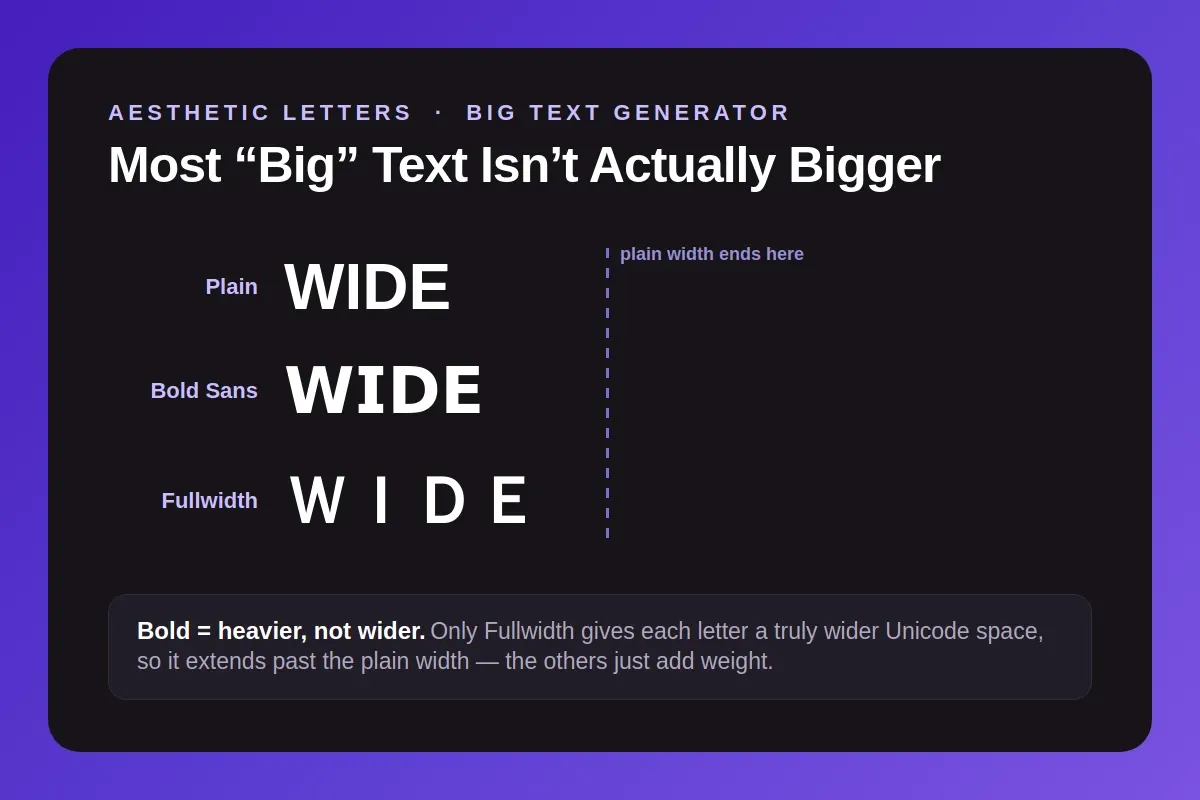
Most tools labeled as a big text generator show styles like bold, gothic, or script text. These styles add visual weight, but they do not make letters wider or larger in shape. A bold letter and a plain letter occupy roughly the same width on screen.
Fullwidth text works differently. Each character sits inside a wider space, defined directly inside Unicode itself. This is not a visual trick added by a website. Unicode assigns fullwidth characters their own dedicated codes, built to occupy more horizontal space than a standard letter.
Fullwidth characters were originally built for East Asian typesetting, where Latin letters needed to match the width of Chinese, Japanese, and Korean characters sitting beside them. That original purpose is exactly why they read as wider today, not a side effect of styling.
This is the real technical reason fullwidth text reads as bigger rather than just heavier. Bold Sans and Bold Serif still belong on this page because weight matters for visual impact too, but only fullwidth text is measurably wider by design, not just darker in tone.
We checked every letter, number, and punctuation mark across Fullwidth, Bold Sans, and Bold Serif before publishing this page, so every character in your text displays correctly, every time.
Where Huge Text Works Best?
Huge text earns its place anywhere a viewer needs to notice something in half a second, not read a full sentence. A few contexts make the biggest difference.

YouTube thumbnails
A thumbnail competes with dozens of others in a crowded feed. Fullwidth or Bold Sans text, previewed at scale before you export the thumbnail, stays readable even when shrunk down to a small preview size on someone's phone.
Website headers and hero sections
A website headline benefits from real visual weight, but plain formatted text stays the safer choice for anything meant to rank in search. Save huge text styles for banners, graphics, or sections that are not carrying the page's main keyword.
Presentation slides and posters
Slides and printed posters get read from a distance, so weight and width both matter more than they would in a paragraph on screen. Bold Serif works well for a formal title slide, while Fullwidth suits a wide banner header.
Discord servers and headers
Discord server names and channel categories often use wide, spaced out text to create a banner style look at the top of a member list. For more Discord specific styles built around usernames and roles, see our discord font generator.
Big Text Limitations You Should Know
Big text carries a few real tradeoffs worth knowing before you use it somewhere it matters.
Character count costs differ by platform
A name that reads as short can still burn through Discord's character limit faster than expected, depending on the style chosen. Discord measures length by raw character code, not by visual letter count.
Bold Sans and Bold Serif both sit in a part of Unicode that costs two units per letter, while Fullwidth costs only one, identical to plain text.
Twitter counts differently. Its weighted system charges extra for Fullwidth characters too, the same rate as Bold Sans and Bold Serif, so switching to Fullwidth does not save any space in a tweet. Our twitter font generator covers more on how Unicode styles affect that count.
Screen readers struggle with all three styles
A screen reader announces these characters by their technical Unicode name, not the letter they resemble. A word in Fullwidth or Bold Serif gets read aloud in a way that sounds nothing like a real word, which makes big text style a poor choice for anything a visually impaired reader depends on.
Some devices cannot display every character
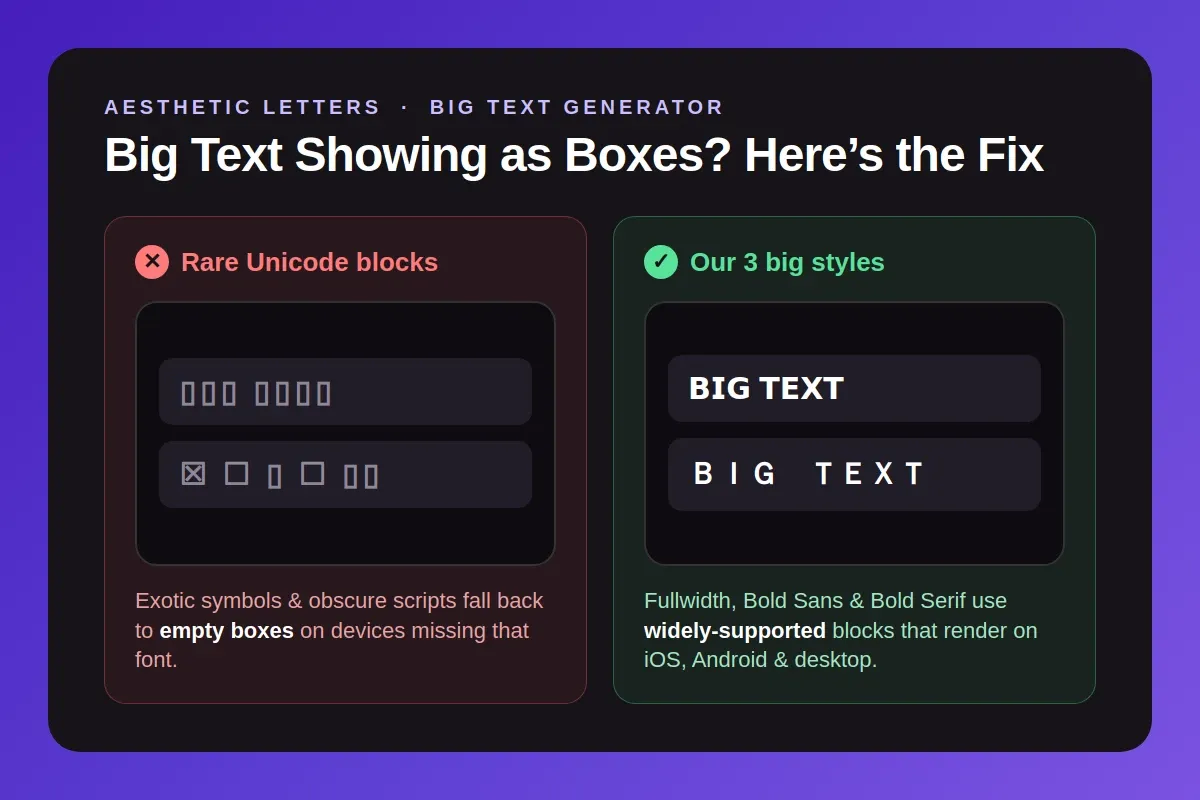
A small box appearing where a letter should be usually points to the device, not the text. Certain phones and apps, especially older ones, simply were never updated with the graphical data required to draw less common Unicode characters. The text itself remains correct even when a device fails to render it properly.
Big Text Not Working?
If your big style stops working somewhere, it usually comes down to one of two causes.
Why some platforms turn your text back to plain letters
Some platforms run a step called Unicode normalization before saving or displaying text you paste in. This step quietly turns styled letters back into plain ones without warning you. Our own Bold Sans version of a word can revert to plain text once this step runs on the other end.
This is the real reason a big font sometimes stops working on one specific site, even though it looked correct on the page where you copied it. The platform is changing your text on its own side, not failing to display what you sent.
Why a letter shows as a box instead of the style you picked
This is a separate problem from the one above. Some older phones and apps simply lack the visual data needed to draw a specific Unicode character. The character itself is correct. The device just cannot render it.
What to do if a platform strips your big text
If your text turns plain after pasting, the platform likely normalized it, and there is no fix on your side. If you see boxes instead, switch to Fullwidth or Bold Sans, since both carry the widest support across devices and platforms.
Explore More Tools
Want more than big text? Check out these generators for letters, symbols, and complete text styling.
Similar Font Styles
Frequently Asked Questions
Yes. There is no cost at any point, and nothing requires a sign up or an email address. Generate and copy as many styles as needed, today or months from now, without anything changing about how the tool works.
No. Both names describe the exact same tool. People search using different words for the same result, so this generator answers to big, large, giant, or huge text without any difference in what it produces.
People use it to style single letters or short initials, often for a monogram, a logo mark, or a profile picture. The same Unicode characters used for full phrases work just as well applied to one letter alone.
Type your text, pick a style card, and click Copy. Open the app or platform where the text belongs, then paste directly into the field. No extra formatting step or app permission gets required anywhere in the process.
Some platforms run a cleanup step called normalization on pasted text, which quietly reverts styled characters back to plain letters. This happens on the platform's side, not because the copied text was wrong or broken.
Yes. Big text works in Instagram captions and bios, Discord messages and display names, YouTube titles and descriptions, and most other platforms that accept plain text without a special formatting toolbar.
Fullwidth letters occupy real extra width, built directly into Unicode. Bold Sans and Bold Serif stay the same width as plain text but carry more visual weight. All three read as big text through different methods.
No. The preview only changes how large your text appears on screen while you check it. The copied result stays the same Unicode characters either way, unaffected by whatever size you previewed it at.
Yes. The preview shows text inside a square, a wide banner, and a tall story shape, so readability gets checked before anything goes live on the actual platform or design.
An older phone or an app missing certain Unicode graphics data is nearly always the cause. Fullwidth and Bold Sans carry the broadest device support of the three styles here, so switching to either one resolves the issue in almost every case.