Bold Font Generator — Copy and Paste

Use this bold font generator to turn any text into a bold style in seconds. Type your words, pick a style, then copy and paste. Every style is built from Unicode characters your device already supports, so nothing needs to download or install.

What is a Bold Font Generator?

A bold font generator changes plain letters into bold Unicode characters. You type a word, and the tool shows you 81 different bold styles, from clean sans bold to heavy gothic letters. The text itself does not change. Only the way it looks changes.

People often call this a heavy typeface, but a real font is a file you install on a device. These styles are something else. They are characters that already exist inside Unicode, the system that gives every letter and number a unique code. Your phone or computer already knows how to show them.

This is why a bold text generator works the moment you open it. You are not downloading a font bolder tool or any new file. You are picking from bold letters that already exist, the same way our Serif Fonts Generator lets you pick a bold serif style for the exact same reason.

Many of our other pages already point people toward loud styles for emphasis. Our Sans Serif Fonts page tells readers to use a bold sans serif style for important words. This page builds on that same idea, with the full set of bold styles in one place.
Choosing a Bold Style for Your Use Case

Picking the right bold font style depends on how much text you are styling and where it will live. Some styles read perfectly in a short username. The same style can lose readability fast inside a longer caption.

Short text — bios, usernames, nicknames

For a single word or short phrase, almost any style works well. This is where the more decorative options like Bold Fraktur or Bold Script feel special instead of heavy. These styles also carry no loud numbers, which rarely matters in a short name.

Longer text — captions, headlines, body copy

For a full sentence or caption, the two simplest bold styles work best. Bold Serif and Bold Sans are the only bold font names on this page with full support for every letter, number, and case. Every other style was built by Unicode for short emphasis, not long paragraphs.

If you want more style options built specifically around Instagram use cases, our Instagram Fonts Generator covers loud styles for names, headings, and important text inside a bio or caption.

How to Copy and Paste Bold Fonts?

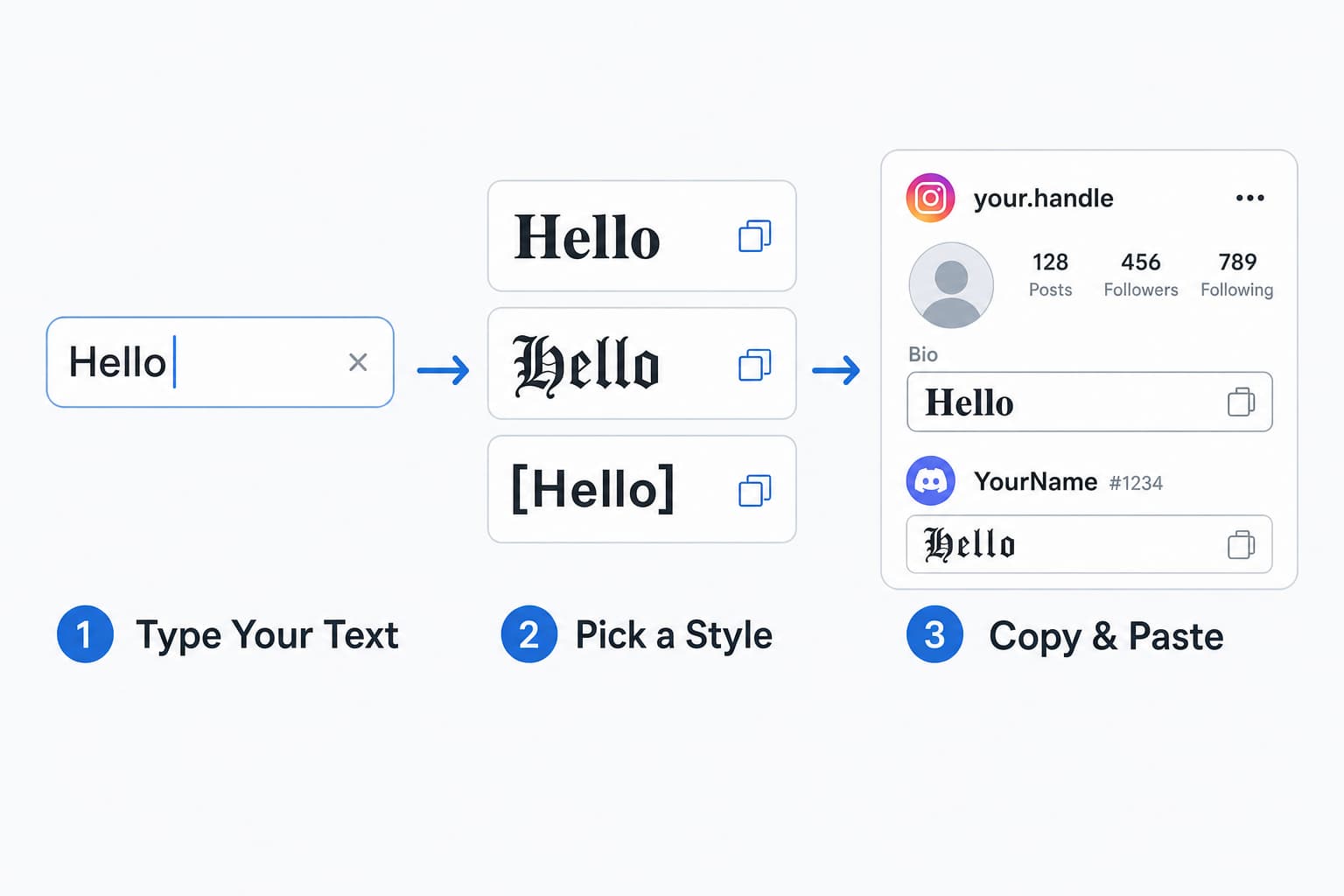
Three step process to copy and paste bold fonts: type your text, pick a bold style from nine cards, then paste the Unicode bold text anywhere

Turning your text strong here works the same way no matter what you type, a name, a short bio, or a full sentence.

1

Type Your Text

Start typing in the field near the top of the page. Whatever you enter updates every style card below it instantly.

2

Pick a Style

Scroll through the nine style cards below. Each one shows a live preview of your exact text, so you see the real result before copying anything.

3

Copy and Paste

Click Copy on the style you want. Paste it into Instagram, Facebook, Discord, WhatsApp, or anywhere else that accepts plain text.

How Bold Text Works Without Formatting Support?

Regular bold text, the kind you get from Ctrl B in Word or two asterisks in a Discord message, is a formatting instruction. The app you are using has to recognize that instruction and draw the letters as bold for you.

Unicode text works differently. Each bold letter is its own character, already built into the device you are using. The app does not need to know what bold means. It just displays the character it already has, the same way it displays any other letter.

This is why bold Unicode text survives copy and paste into places that block normal formatting, like usernames, bios, and nicknames. There is no instruction to lose, because the boldness is part of the character itself, not a style applied on top of it.

Where Bold Text Works Best?

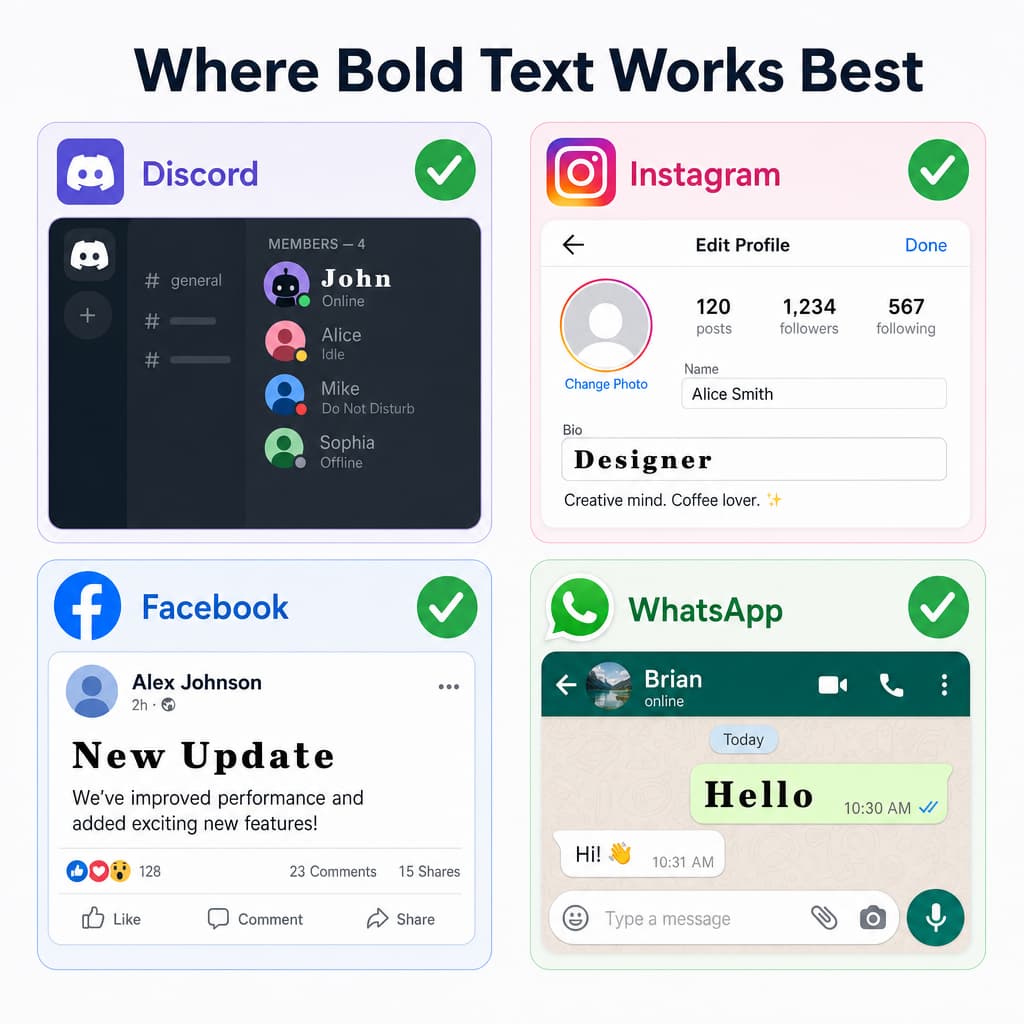
Bold Unicode text displayed correctly across Discord username, Instagram bio, Facebook post, and WhatsApp message showing platform compatibility

Bold Unicode text works almost anywhere that accepts plain text, but a few platforms have rules and limitations worth knowing before you paste.

Discord — the formatting gap

Discord has its own bold formatting using two asterisks, but it only works inside chat messages and forum posts. It does not work in usernames, nicknames, About Me text, server names, or channel topics. Bold Unicode text works in all of those places instead. For a full set of Discord-specific styles beyond bold, try our discord font generator.

Discord — the character limit most people miss

Discord measures username and nickname limits by character units, not by how a name looks on screen. Every bold Unicode letter counts as two units, so a name that looks twenty characters long can use forty units and get rejected on save.

Facebook — which bold styles are safe in ads

Facebook has no bold button anywhere in its own tools. You cannot select text and press Ctrl B inside a post, a Page description, a Group announcement, or a Marketplace listing. This is the real reason a bold font generator for Facebook exists at all.

If you plan to use heavy text inside a paid Facebook ad, our Facebook Font Generator has a full breakdown of which styles pass review and which get flagged. Bold Serif and Bold Sans are named there as the safest choices.

Twitter/X — the character cost trade-off

Bold Unicode letters count as two characters each against X's 280-character tweet limit, because they sit in the supplementary Unicode plane. A fully bold tweet burns through your budget twice as fast as plain text.

Bold works best in display names or short bio hooks where the visual weight matters more than length. For the full breakdown and styles built specifically for X, see our twitter text generator.

Website headlines — a real trade off

Putting bold Unicode text inside an actual website headline comes with a cost. Search engines read a bold Unicode letter as a different character from the plain version, so the headline may not get indexed for that plain text keyword the way a normal headline would.

This is worth knowing if you run a website, not just a social media profile. Bold Unicode text looks great in a screenshot or a social caption. Inside real website copy meant to rank in search, plain text with real thick formatting stays the safer choice.

Bold Text Limitations You Should Know

Bold Unicode text has real limits worth knowing before you rely on it for important text.

Why some bold styles skip digits and lowercase letters

We checked every letter, number, and case across all 81 styles one by one before building this page. Unicode only built complete dark alphabets for two of them, Bold Serif and Bold Sans. Every other style covers capital letters only, with no bold lowercase letters and no bold digits.

This is a real limit inside Unicode itself, not a bug in this tool. Bold Script has no thick number set at all. Type a date or a price in that style, and the numbers stay plain while the letters turn bold. Every style card shows this gap clearly instead of hiding it.

Why double struck bold has seven hidden exceptions

Double struck letters look heavy and outlined at the same time, which makes them popular for headers and usernames. Seven capital letters in this style, C, H, N, P, Q, R, and Z, live in a completely different part of Unicode than the other nineteen. Most generators get this wrong and show a broken box for these seven letters instead of the correct character.

We checked every letter against the official Unicode data before building this style. Our generator maps each one by hand to its correct location, so every letter in your text displays correctly, every time.

A note on screen readers and accessibility

Regular bold letters, made with a formatting instruction, gets announced as bold, with a small change in tone. Bold Unicode text gets read out letter by letter instead, as something like mathematical bold capital B, which does not sound like a real word at all.

Because of this, bold font generator work best for short phrases, headlines, or usernames, not for long paragraphs that someone needs to hear read aloud. Plain thick formatting stays the more accessible choice for any text that carries important information.

Bold Font Styles, Explained

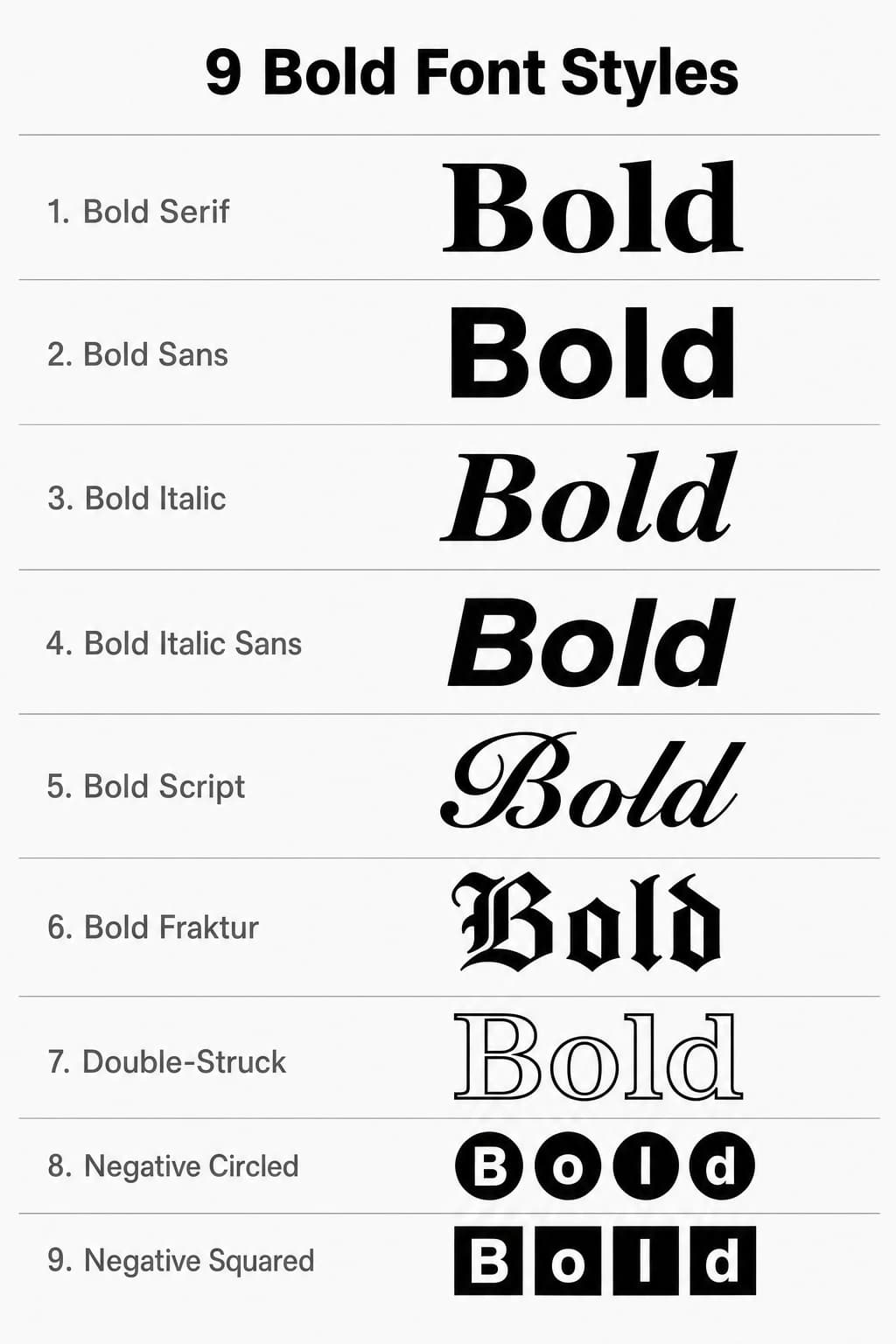
Comparison chart of nine Unicode bold font styles showing Bold Serif, Bold Sans, Bold Italic, Bold Script, Bold Fraktur, Double-Struck, Negative Circled, and Negative Squared applied to the same sample text

Each style on this page has its own story. Here is where nine of the most popular ones come from, and why they look the way they do.

Bold Serif

The classic mathematical bold alphabet. Every uppercase letter, lowercase letter, and digit has its own dedicated Unicode code point. This is the most widely supported bold style and the safest choice for any platform.

Bold Sans

A clean, modern bold style without the small strokes (serifs) at the ends of letters. Like Bold Serif, it covers the full alphabet and all ten digits. This style reads well in both short usernames and longer captions.

Bold Italic

Combines the weight of bold with the forward lean of italic text. Unicode provides this style for uppercase and lowercase letters only, with no dedicated digit set. Best suited for emphasis within a short phrase.

Bold Italic Sans

The sans-serif version of bold italic, combining clean lines with forward-leaning weight. This style covers uppercase and lowercase letters and works well for modern, dynamic-looking text.

Bold Script

A heavier version of the cursive script alphabet. Each letter has flowing connections typical of handwritten text, but with thicker strokes. Covers uppercase and lowercase letters without bold digits.

Bold Fraktur

The heavy version of the old German blackletter style. Bold Fraktur letters carry the ornate medieval look with added weight. Popular for gothic-themed usernames and dramatic display text.

Double-Struck

Letters that appear bold and outlined at the same time, originally used in mathematics to denote special number sets. Seven capital letters (C, H, N, P, Q, R, Z) live in a different part of Unicode than the rest, which many generators get wrong.

Negative Circled

Each letter appears inside a filled dark circle, creating an eye-catching badge-style look. Covers uppercase letters and digits 0 through 9. Lowercase input renders as uppercase automatically since no separate lowercase block exists.

Negative Squared

Each letter appears inside a filled dark square, creating a bold block-style look. This style only covers capital letters with no digit support, making it ideal for short acronyms, initials, or single-word emphasis.

Bold Font Not Working?

If your bold font stops working somewhere, it usually comes down to one of two causes.

Why some platforms silently turn your bold text back to plain text

Some platforms run a step called Unicode normalization before saving or displaying your text. This step quietly turns bold Unicode letters back into plain letters without telling you. We tested this directly. Our own Bold Sans version of the word Bold becomes plain Bold once this step runs.

This is the real, technical reason bold style sometimes does not work on a specific site, even though it worked perfectly on the page where you copied it. The platform is changing your text on its own side, not failing to display it.

Why a letter shows as a box or question mark instead

This is a separate problem from the one above. Some older phones and apps simply do not have the visual design needed to show a specific Unicode character. The character is correct. The device just cannot draw it.

What to do if a platform strips your bold style

If your text turns plain after pasting, the platform likely normalized it, and there is no fix on your side. If you see boxes or question marks instead, switch to Bold Serif or Bold Sans, since these two styles have the widest support across every device.

Explore More Tools

Want more than bold text? Check out these generators for letters, symbols, and complete text styling.

Frequently Asked Questions

There is no cost at any point. You will not be asked to sign up, give an email address, or pay before copying a single style. Use it once for a username today, then come back next month for a whole caption, with nothing changing in between.

This happens when your device or the app you pasted into cannot display a specific Unicode character. It is most common on older phones. See the troubleshooting section above for which two styles avoid this problem almost everywhere.

Yes. Bold Unicode font works in Instagram bios, captions, and comments, in WhatsApp messages and status updates, and in Discord messages, usernames, and server names. It also works on X, Facebook, TikTok, and most other platforms that accept plain text.

Unicode only created bold number sets for two styles, Bold Serif and Bold Sans. Styles like Bold Script and Bold Italic never had loud digits added to the Unicode standard, so numbers in those styles stay in plain text. This is a Unicode limit, not something this tool can add.

No. Ctrl B applies a style inside an app like Word, and that styling disappears if you copy the text somewhere else. Bold Unicode text is made of different characters entirely, so it stays loud no matter where you paste it, even in places that block formatting completely.

Some platforms run a cleanup step on pasted text, explained in full above in the Bold Text Not Working section. It happens on the platform’s side, not because the text you copied was wrong.