What is a Number Font Generator?

A number font generator changes plain digits into styled versions of the same numbers. You type a number, and the tool shows you many ways to display it, from bold numbers to circled numbers to line fonts. Nothing about the number itself changes, only how it looks.
People sometimes call these "number fonts," but that name is a little misleading. A real font is a file you install on your device. These styles are something else: characters that already exist inside Unicode, the system that gives every letter, number, and symbol a unique code. Your device already knows how to show them, so there is nothing to add.
This is why a number font generator works the moment you open it. You are not downloading new symbols. You are picking from ones that already exist, the same way our Sans Serif Fonts tool works for letters instead of digits.
How to Copy and Paste Number Fonts?
Getting your styled numbers takes three steps. There is nothing to download and nothing to set up first.
1
Type Your Number
Use the box at the top of the page. You can enter a single digit or a long number like a date or a price.
2
Pick a Style
Browse the cards above and find one that fits what you are making.
3
Copy and Paste
Click the card to copy it, then paste it into your bio, post, or message.
Why These Numbers Work Everywhere
Every character in Unicode has its own code point, a kind of address that tells your device exactly what to draw. The bold number 𝟏 and the plain number 1 have different code points, even though they mean the same value.
This system lives inside two main areas. One is called Mathematical Alphanumeric Symbols, originally made for math papers that needed bold or italic letters with a fixed meaning. The other is Enclosed Alphanumerics, built for circled and bracketed numbers used in lists and signs.
Because phones, browsers, and apps all read the same Unicode standard, a styled number made on one device looks the same on another. That is the real reason copy and paste works without any setup.
Popular Number Font Styles, Explained
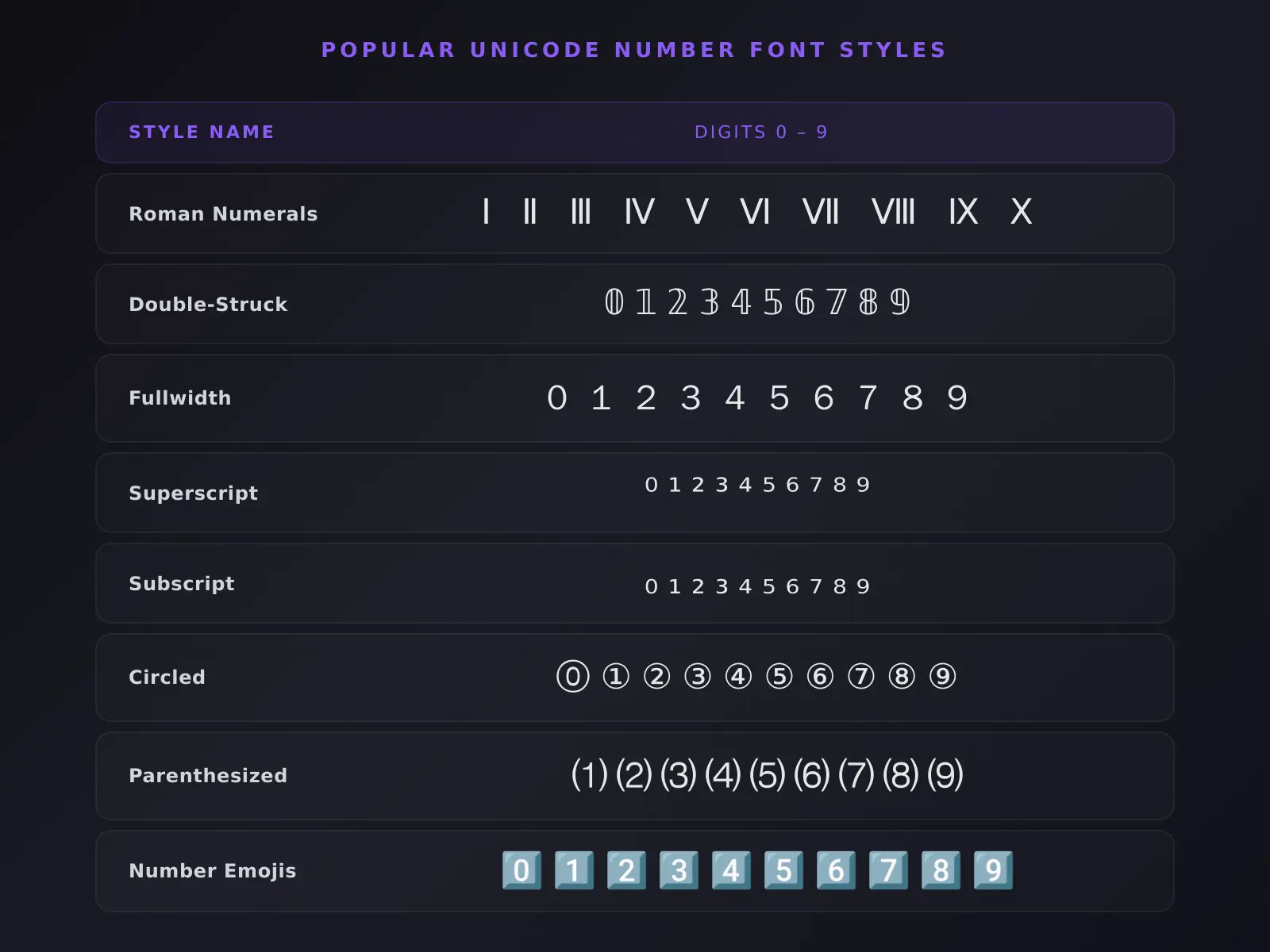
Each style on this page has its own story. Here is where eight of the most popular ones come from, and why they look the way they do.
Roman Numerals
Roman numerals are one of the oldest number systems still in everyday use, dating back to ancient Rome. Unicode gives them their own characters, separate from regular letters, so software can tell “Ⅰ” the numeral apart from “I” the letter. This is why clock faces, book chapters, and outlines often use these special characters instead of typing a capital I.
Double-Struck Numbers
This style started in university math classrooms. Professors writing on chalkboards could not make true bold letters with chalk, so they drew each stroke twice to create a bolder look. You will still see this style in math textbooks today, used to label important groups of numbers.
Fullwidth Numbers
These wider digits come from East Asian typesetting. Chinese, Japanese, and Korean characters are naturally square shaped, so early computer systems made matching wide versions of Western numbers and letters. This kept everything lined up neatly when the two writing styles appeared in the same line of text.
Superscript and Subscript Numbers
Science and math needed a way to write formulas without special formatting tools, which is exactly why these small raised and lowered numbers exist. A chemical formula like water, written as H followed by a small 2, uses a true subscript character rather than just a smaller font size.
Circled Numbers
Circled numbers were first designed as list markers, especially in East Asian documents where they replaced plain numbers with periods. You will still see them used this way today, in instructions, footnotes, and numbered steps where a small circled mark stands out more than a plain digit.
Parenthesized Numbers
Long before computers, typewriters could not draw a circle around a number. People used parentheses instead, like (1) or (2), as a simple stand-in. This older typewriter habit became its own permanent character set, which is why parenthesized numbers still show up often in legal documents and academic writing.
Number Emojis
These are not separate emoji characters at all. Each one is built from a regular digit, a small invisible marker, and a square symbol layered together. This combination is what makes phones and apps show your number inside a colorful keycap, the same look used for buttons on a phone dial pad.
Arabic and Devanagari Numerals
Not every culture writes numbers the same way. Arabic-Indic numerals are used across the Arabic speaking world, while Devanagari numerals appear in Hindi and several other South Asian languages. Both are genuine number systems with their own characters, not stylized versions of 0 through 9.
Where to Use Numerical Fonts?
Bold Numbers or Circled Numbers can make a follower count or a sale price stand out in an Instagram bio. Double-Struck Numbers can give a gaming name a sharper look without changing what it says. Pair them with Instagram Fonts to style your whole bio, not just the numbers in it.
On WhatsApp or Discord, styled numbers are useful for countdowns, "Day 12 of 30" posts, or marking steps in a list. Superscript and Subscript Numbers are handy for school work, like writing a footnote or a chemical formula. For styled text on Discord beyond just numbers, try our discord text generator.
Want your whole caption styled, not just the numbers in it? Our Fancy Fonts Generator covers letters, symbols, and more in the same copy and paste style.
A Quick Note on Number Styles in Typography
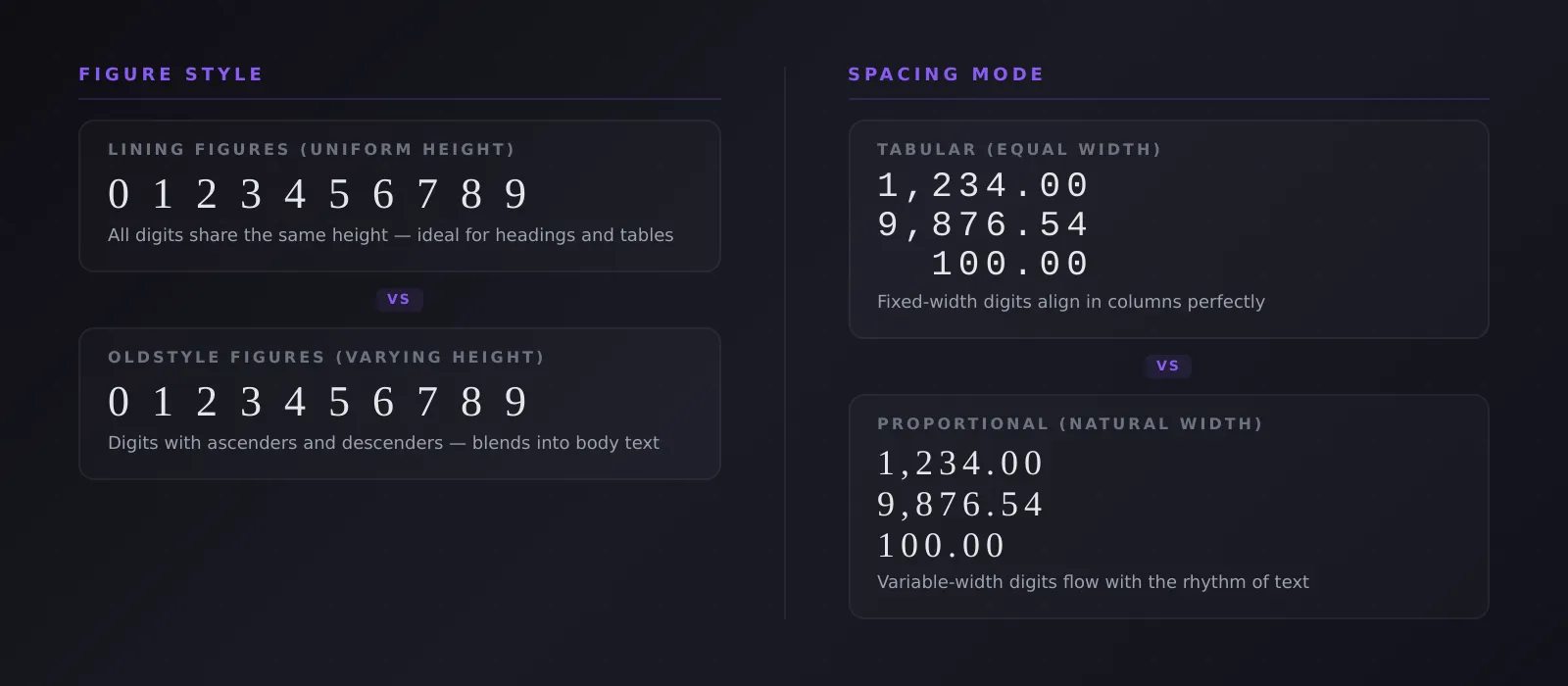
Professional typography treats numbers differently depending on where they appear. In a heading or a table, every digit usually looks uniform and upright. But inside a normal sentence, some fonts swap in numbers with small tails and uneven heights, called oldstyle figures, so they blend in next to lowercase letters instead of standing out.
There is also a spacing difference. Tabular figures all take up the same width, so columns of numbers line up neatly in a table. Proportional figures vary in width instead, matching the natural rhythm of regular text.
These terms describe how a font is built, not the Unicode styles on this page. Still, they explain why number design has always mattered, long before copy and paste existed.