What Are Discord Fonts?
Discord fonts are not real font files. Discord cannot install a new font on your device, and it never lets you upload one either. What people call a discord text font is actually a set of Unicode characters that already look bold, gothic, or circled on their own.
Unicode is a public list of characters used by every phone, computer, and app. Most letters you type every day sit inside this list. Unicode also holds thousands of extra characters built to look like styled letters. A discord font changer simply swaps your normal letters for these lookalike characters.
This is why a discord text generator works without any download or app. You are not changing a setting inside Discord. You are pasting different characters that Discord could already display before you ever opened this page.
Because Unicode is a free public standard, these discord letters belong to no one. They can be copied, pasted, and reused anywhere text is allowed, including the same styles already covered on our Facebook Font Generator, since both platforms read plain Unicode text the same way.
Where Discord Fonts Actually Work (and Where They Don’t)
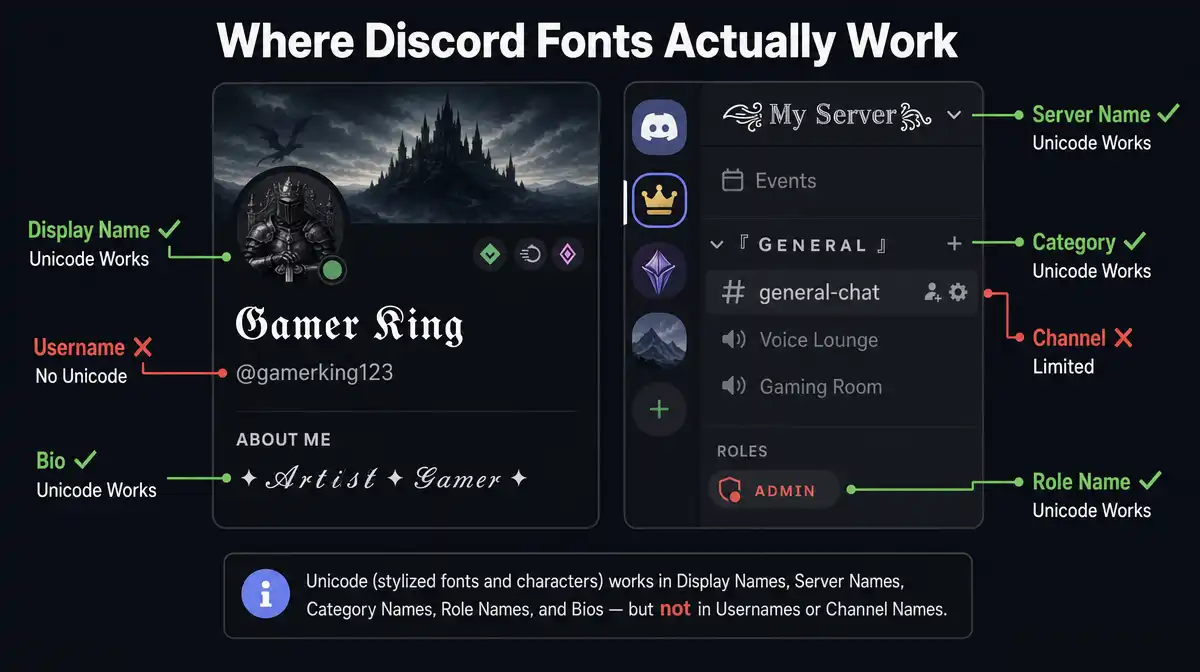
You may have seen other sites say these styles work in your username or channel name. They do not. Discord splits your identity into separate fields, and each field follows its own rules. Knowing the difference saves you a failed paste and a confused friend.
Your Discord username is the @handle people use to add you as a friend. It only accepts lowercase letters, numbers, periods, and underscores. No styled discord fonts will ever work here, no matter what tool you use. This is a Discord rule, not a limit of this generator.
Your display name is different. It is the name people actually see in chats and servers. It accepts almost any Unicode character, including every style on this page and the broader styles covered on our Fancy Text Generator. If you want a discord name font, this is the field to use.
Server nicknames work the same way as display names, but only inside one server. Server names, role names, and your About Me bio also accept full Unicode. Channel names are more limited, since Discord forces lowercase letters and hyphens there. Category names above your channels do accept full Unicode.
| Field | Accepts Unicode fonts? |
|---|
| Username (@handle) | No |
| Display name | Yes |
| Server nickname | Yes |
| Server name | Yes |
| Category name | Yes |
| Channel name | Mostly no |
| Role name | Yes |
| About Me / bio | Yes |
| Chat message | Yes |
Discord Markdown vs. Unicode Fonts
Discord text styles come from two different systems, and most people only discover that when something doesn’t work the way they expected.
Discord Markdown is a built-in formatting system. You type **bold** for bold, *italic* for italic, __underline__ for underline, and ~~strike~~ for strikethrough. This only works inside chat messages, the same field where Cursive Fonts styles already display correctly. It does nothing in your username or server name.
| What you want | Markdown syntax |
|---|
| Bold | **text** |
| Italic | *text* |
| Underline | __text__ |
| Strikethrough | ~~text~~ |
| Spoiler | ||text|| |
| Inline code | `text` |
One detail almost no other site explains. Discord also supports masked links, written as [label](url). These hide a long link behind short text. But masked links only render inside bot messages, embeds, and webhooks. If you type one yourself in a normal chat message, Discord shows it as plain text, brackets and all.
Unicode fonts solve a different problem. They work in every field Markdown cannot reach, including your display name, server name, and bio. This generator builds discord font styles using Unicode characters, so you get styling in the exact places Markdown was never designed to touch.
Why Do Some Discord Fonts Show as Boxes or Missing Letters?
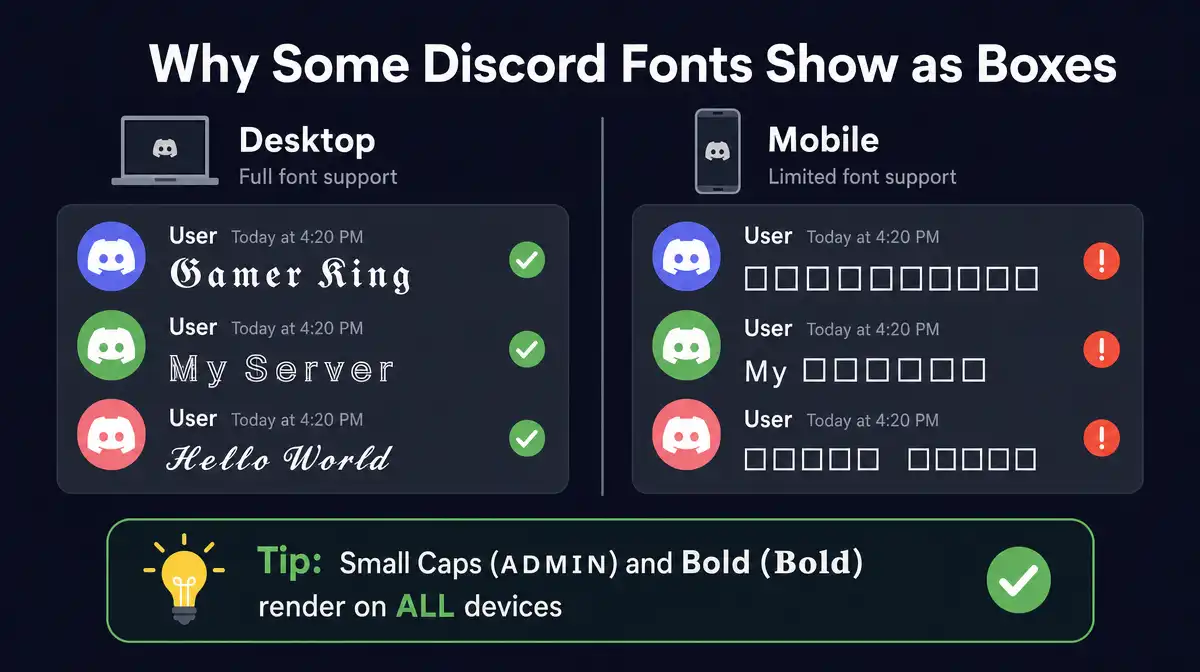
If a pasted style suddenly drops a letter or shows a small box, it is not a glitch in this tool. It comes from a real gap inside the Unicode standard itself.
When Unicode built its set of styled math letters, it found that 24 of them already existed somewhere else, inside an older block called Letterlike Symbols. Rather than create duplicate characters, Unicode left those 24 spots empty and pointed back to the older versions instead.
The italic lowercase h is one example. There is no italic h inside the main styled block. The real character lives at a different Unicode address, reserved years earlier for the science symbol for the Planck constant. A few script capital letters follow the same pattern.
This generator accounts for these gaps, so your discord fonts stay complete. Many free tools online skip this step, which is why some text styles look broken on certain letters but fine on others. A related issue, where bold Unicode reverts to plain text, is covered on our Bold Text Generator.
12 Discord Font Styles to Copy and Paste
This discord font generator gives you 12 discord text styles cards built for real Discord use, from bold headers to bot command lists. Type your text once, then scroll through the cards above to compare every style side by side. Each one is ready to copy and paste.
Bold Discord works best for announcements and category headers, where you want a line to stand out instantly. Gamer Gothic and Heavy Gothic both suit roleplay and fantasy servers, with Heavy Gothic carrying more visual weight. Server Outline gives server names a clean, structured look, though a few uppercase letters need special handling.
Discord Script fits art, study, and chill community servers that want a softer feel. Mono Tag suits bot command lists, since every letter shares the same width. Tiny Caps keeps role names subtle and easy to read, building on the same small caps style covered on our Serif Fonts page.
Bubble Tag works well for voice channel names, while Boxed Tag matches the sharp, tactical look many competitive and FPS clans prefer. Wide Tag spaces out a server name for a banner style look. Flipped Tag and Glitch Tag round out the set for playful or spooky text moments.
How to Use Discord Fonts?
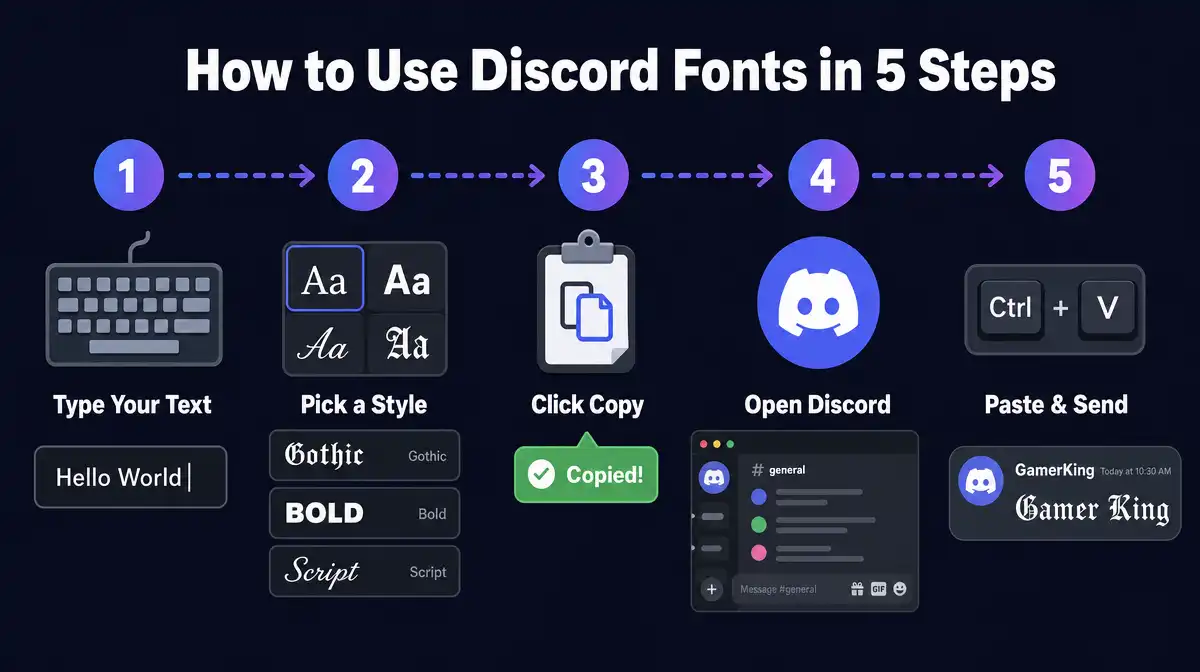
Using a discord font styles your name or server without any app, plugin, or Nitro subscription. The steps below cover the most common fields people ask about.
1
Display name
Type your text into the generator above and pick a style. Copy it, then open Discord and go to User Settings, then My Account, then Profiles. Paste your styled text into the Display Name field and save.
2
Your nickname in one server
Find your name in the member list, click it, and look for the option to edit your server profile. This only changes how you appear in that specific server, your global username stays the same everywhere else.
3
The server’s name
This one’s only available if you have admin access. Head into the server’s settings and find the Overview tab, where the server name field is waiting to be updated.
4
A role’s name
Also admin-only. Inside settings, the Roles tab lists every role in the server, picks the one you want to restyle and update its label. Useful for making mod or VIP roles visually pop in the member list.
5
Chat message
Paste your styled discord fonts directly into the message box and send. No extra steps are needed, since message fields accept Unicode the same way display names do.
Best Discord Font Styles by Server Type
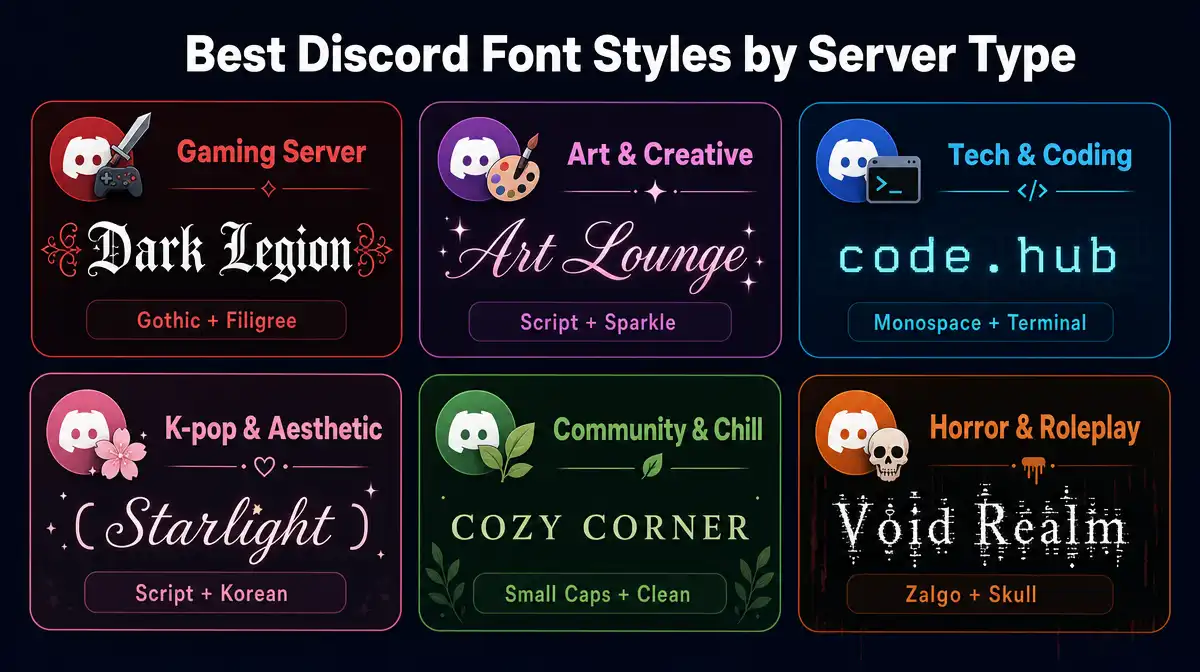
Different servers benefit from different discord text styles, based on how members read and scan text inside that community.
Gaming and competitive servers
Gaming and competitive servers often lean on Bold Discord and Boxed Tag. These styles feel sharp and structured, matching the fast pace of clan chats, the same energy covered on our Stylish Text Generator. Many FPS and esports communities favor this look for display names and channel categories.
Roleplay and fantasy servers
Roleplay and fantasy servers suit Gamer Gothic or Heavy Gothic. The blackletter look is tied to medieval and fantasy writing, so it sets a tone before a member reads a single word. Many tabletop and lore heavy servers use this style for channel categories.
Aesthetic and chill servers
Aesthetic and chill servers tend to favor Discord Script or Wide Tag. These styles feel calmer and less aggressive, which fits art, study, and music communities, similar to the soft and welcoming styles on our Cute Fonts page. A softer style can make a server feel more welcoming to new members.
Professional and developer servers
Professional and developer servers usually do better with a clean style like Bold Discord or Mono Tag, since both stay highly readable. Heavily decorated styles can slow down reading in a server built around fast technical chat and bot commands.
What Font Does Discord Use?
Discord’s app interface, including chat text, menus, and buttons, uses a custom typeface called gg sans. Discord rolled this out in December 2022, replacing an older licensed font called Whitney.
A separate typeface called Ginto Discord exists too, but it is only used for Discord’s logo and marketing materials, not the app itself. The two are easy to mix up, since both come from the same brand refresh.
Neither font matters for discord fonts copy and paste tools like this one. Your styled text is not a font setting. It is a string of Unicode characters that displays inside gg sans the same way any other text does.